

1stwebdesigner |

| 35 Security Plugins to Make Your Wordpress Bulletproof Posted: 28 Jul 2010 02:00 PM PDT
For simple users,who don’t code a lot, plugins is the best way to secure your blog. They're free, easily usable and safe. This post assembles 35 best plugins to make your blog bulletproof. They're each devised for different purposes, so you will get the best protection from each field. Secure Your Login1. Semisecure Login ReimaginedSemisecure Login Reimagined increases the security of the login process by using a combination of public and secret-key encryption to encrypt the password on the client-side when a user logs in. JavaScript is required to enable encryption. It is most useful for situations where SSL is not available, but the administrator wishes to have some additional security measures in place without sacrificing convenience.
2. Stealth LoginThis plugin allows you to create custom URLs for logging in, logging out, administration and registering for your WordPress blog. Instead of advertising your login URL on your homepage, you can create a URL of your choice that can be easier to remember than wp-login.php, for example you could set your login URL to http://www.myblog.com/login for an easy way to login to your website.
3. Login LockDownLogin LockDown records the IP address and timestamp of every failed login attempt. If more than a certain number of attempts are detected within a short period of time from the same IP range, then the login function is disabled for all requests from that range. This helps to prevent brute force password discovery.
4. Chap Secure LoginWhenever you try to login into your website, you can use this plugin to transmit your password encrypted. The encryption process is done by the Chap protocol. By activating the Chap Secure Login plugin, the only information transmitted unencrypted is the username, password is hidden with a random number (nonce) generated by the session – and opportunely transformed by the MD5 algorithm. In the first login there will be an error, but don’t worry is only a technical error. Indeed in the next login’s operation, if the values are correct, there will not be errors.
Admin Area1. Admin SSLAdmin SSL secures login page, admin area, posts, pages – whatever you want – using Private or Shared SSL. Once you have activated the plugin, you have to go to the Admin SSL config page to enable SSL.
Database1. WP-DB-BackupWP-DB-Backup allows you easily to back up your core WordPress database tables. You may also backup other tables in the same database.
2. Remote Database BackupThis plugin creates SQL dumps of your WordPress database. It is based on the WordPress Database Backup plugin (http://www.ilfilosofo.com/blog/wp-db-backup) – but it removes some of the security restrictions in the plugin to enable automated remote backups. You still need the admin user name and password to do a remote backup.
3. WP-DB ManagerThis plugin allows you to optimize database, repair database, backup database, restore database, delete backup database , drop/empty tables and run selected queries. It supports automatic scheduling of backing up and optimizing of database.
4. BackUpWordPressBackUpWordPress is a backup & recovery suite for your WordPress website. This plugin allows you to back up database tables as well as files and comes with a rich set of options.
5. Wordpress 1 Click EZ BackupEZ Backup has been turned into a simple one click operation. Click the button and watch your files and database backup be created. You can create a backup of all your webspace files or backup just your wp-content folder all from this one plugin. Unlike the Full EZ Backup plugin this one does not require any special information such as usernames or passwords etc. This plugin costs $5. 6. myEASYbackupThis plugin allows you to back up, restore, migrate your WordPress installation, both files and mySQL tables with a single click. When performing a backup, myEASYbackup creates a compressed data set file that can be stored outside the WordPress installation directory. A list of all data sets on the server is also logged in the admin area.
Spam1. Antispam BeeAntispamBee protects blogs from digital rubbish. It is made up of sophisticated techniques and analyzes comments including pings. Also, for reasons of data privacy, the use of AntispamBee is a safe solution, as it is anonymous and registration-free.
2. NoSpamNXNoSpamNX is the successor of Yawasp (Yet Another WordPress antispam plugin) and is a plugin to protect against automated comment spam (spambots). While Yawasp changed the names of the form fields in the comment template, NoSpamNX works without these modifications, but is equally effective. By eliminating the need for modifications the form field need maximum compatibility with other WordPress plugins or browser is ensured.
3. AkismetAutomattic Kismet (Akismet for short) is a collaborative effort to make comment and trackback spam a non-issue and restore innocence to blogging, so you never have to worry about spam again.
4. Math Comment Spam ProtectionAsks the visitor making the comment to answer a simple math question. This is intended to prove that the visitor is a human being and not a spam robot. Example of such question: What is the sum of 2 and 9?
5. Defensio Anti-SpamDefensio is an advanced spam filtering web service that learns and adapts to your behaviors and those of your readers. Advanced features such as support for OpenID, detailed statistics, charts, RSS feed of our comments (innocent and spam) and counter widget are also available.
6. SI CAPTCHA Anti-SpamAdds CAPTCHA anti-spam methods to WordPress on the comment form, registration form, login, or all. In order to post comments or register, users will have to type in the code shown on the image. This prevents spam from automated bots. Adds security. Works great with Akismet. Also is fully WP, WPMU, and BuddyPress compatible.
7. reCAPTCHAreCAPTCHA is an anti-spam method originating from Carnegie Mellon University which uses CAPTCHAs in a genius way. Instead of randomly generating useless characters which users grow tired of continuously typing in, risking the possibility that spammers will eventually write sophisticated spam bots which use OCR libraries to read the characters, reCAPTCHA uses a different approach.
8. BlackholeBlackhole is a trap for bad bots. The concept is simple: include a hidden link to a robots.txt-forbidden directory somewhere on your pages. Bots that ignore or disobey your robots rules will crawl the link and fall into the trap, which then performs a WHOIS Lookup and records the event in the blackhole data file. Once added to the blacklist data file, bad bots immediately are denied access to your site.
9. Invisible DefenderThis plugin protects registration, login and comment forms from spambots by adding two extra fields hidden by CSS. This approach gave me 100% anti-spam protection on one of my sites. Other1. Secure WordPressLittle help to secure your WordPress installation. This plugin removes error information on login page, adds index.html to plugin directory, removes the wp-version, except in admin area.
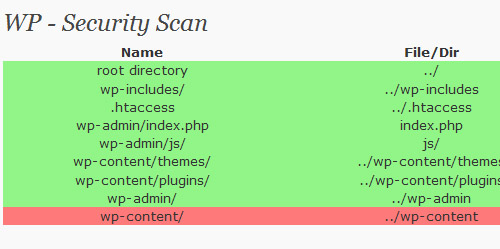
2. WP Security ScanThis plugin will scan your WordPress installation for security vulnerabilities and it will suggest some corrective actions.
3. AskApache Password ProtectThis plugin doesn’t control WordPress or mess with your database, instead it utilizes fast, tried-and-true built-in Security features to add multiple layers of security to your blog. This plugin is specifically designed and regularly updated specifically to stop automated and unskilled attackers attempts to exploit vulnerabilities on your blog resulting in a hacked site.
4. TAC (Theme Authenticity Checker)TAC stands for Theme Authenticity Checker. Currently, TAC searches the source files of every installed theme for signs of malicious code. If such code is found, TAC displays the path to the theme file, the line number, and a small snippet of the suspect code. As of v1.3 TAC also searches for and displays static links.
5. HTTP AuthenticationThe HTTP Authentication plugin allows you to use existing means of authenticating people to WordPress. This includes Apache’s basic HTTP authentication module and many others. 6. AntiVirusViruses, worms and malware exist for WordPress and could easily attack your WordPress installation. AntiVirus for WordPress monitors malicious injections and warns you of any possible attacks. It also has multilingual support.
7. Secure FilesThis plugin allows you to upload and download files from outside of your web document root for security purposes. It can be used to can restrict file downloads to users that are logged in, or have a certain user level. 8. Replace WP-VersionSecurity your WordPress-Installation and eliminate or replace your wp-version and database-version on easy way with a small plugin. If you’re running an older version of WordPress, anyone can view source to see what attacks might work against your blog. This plugin replaces the WP-version with a random string < WP 2.4 and eliminate WP-version > WP 2.4. 9. WP Email GuardWP Email Guard protects your email addresses included on any post or page from being crawled by spammers. It converts every email written within your post body into a JavaScript code, so the emails is readable and can be clicked by humans only. Spammers can’t crawl JavaScript. 10. WordPress File MonitorMonitors your WordPress installation for added/deleted/changed files. When a change is detected an email alert can be sent to a specified address.
11. WP DephormWP-Dephorm protects your users from the prying eyes of phorm. This is achieved by setting a cookie to opt out of the phorm information mining. Your blog viewers will not have their information stored and used in marketing campaigns whilst viewing your site. 12. WordPress FirewallThis WordPress plugin investigates web requests with simple WordPress-specific heuristics to identify and stop most obvious attacks. There exist a few powerful generic modules that do this; but they’re not always installed on web servers, and difficult to configure.
13. Secure ContactSecureContact is a drop in form for users to contact you, based on the WP Contact Form plugin by Ryan Duff. It offers enhanced security by using captcha images. 14. Fast and Secure Contact FormFast and secure contact form for WordPress. This contact form lets your visitors send you a quick E-mail message. Blocks all common spammer tactics. Spam is no longer a problem. Includes a CAPTCHA and Akismet support. Additionally, the plugin has a multi-form feature, optional extra fields, and an option to redirect visitors to any URL after the message is sent. Super customizable.
15. Ultimate Security CheckThe Ultimate Security Check plugin helps you identify security problems with your WordPress installation. It scans your blog for hundreds of known threats, then give you a security "grade" based on how well you have protected yourself. 16. Content Security PolicyContent Security Policy prevents content injection attacks by allowing admins to specify which sites they trust to serve JavaScript and other types of content in their site. Any content which is not explicitly allowed by the policy will be blocked from loading.
Further Resources
|
| Ultimate Roundup of 200+ Adobe Illustrator Tutorials Posted: 28 Jul 2010 03:00 AM PDT
All the tutorials are categorized in 6 categories so that you can easily find what you are looking for (clicking on the category will navigate you to it):
1. Create an Elegant Theater Interior with Illustrator
2. How to Create a Vintage Ocean Liner Poster
3. Create a Realistic, Vector Building Illustration
4. Create an Illustration of a Pearl-Filled Clam on an Ocean Bed
5. Learn to Create a Financial Crisis, Vector Illustration
6. How to Create a Cute Earth Illustration in Vector
7. How to Make a White Holiday Scene in Illustrator
8. Smoothly Shift Winter Colors, While Creating an Icy, Vector Landscape
9. How to Create a Landscape Wallpaper for your Desktop
10. How to Create a Cartoon Spaceship Interior in Under One Hour
11. How to Create Your Own Stylized Vector City
12. How to Create a Classic Vector Painting with Watercolor Washes and Line Art
13. How to Create a Fun Hot Air Balloon Sky Scene
14. How to Create a Textured Vector Landscape
15. How to Create a Stylized Underwater Scene
1. Create Colorful, Layered Paper Type in Illustrator
2. How to Create a Smokin' Western Type Treatment in Illustrator
3. Make a Torn Vector Desktop Wallpaper with Angled Text
4. Create an Old Paper & Feather Pen Illustration
5. Create a Swirly Type Treatment
6. Create a bubble text effect
7. Create a folded paper text effect
8. Create An Editable Stitched Label Type Treatment
9. Turn Any Font Into a Sketch Font
10. Creating Editable Letterpress Styled Text
11. How to Create a Trendy Retro Type Treatment
12. Creating an Environmentally Friendly Green Type Treatment
1. Create a Cute Retro-Flavored Teddy Bear with the Gradient Mesh Tool
2. Modeling the Human Face in Illustrator
3. How to Design a Cheeky Koala Mascot Head
4. Create a Colorful, Vector Carnival Mask
5. How to Create Typeface Characters
6. Create a Set of Shiny Character Eyes
7. How to Create a Curious Owl in Illustrator CS4
8. How to Create a Vector Goldfish in Six Steps
9. Use Illustrator to Create a Fun, 3D, Character Logo
10. Tracing a Vector Face From a Reference Photo
11. How to Create an Eagle Head Sticker
12. How to Create a Stinking Zombie Flesh-Eater in Illustrator
13. How to Create a Mosaic Portrait from a Photograph
14. How to Create a Fantasy Character in Illustrator
15. How to Illustrate a LeBron James Cartoon Character
16. How to Create a Vector Illustration and Prepare it for Micro-Stock Sale
17. How to Create a Web Site Mascot
18. How to Create a Cartoon Character with Expressive Lines
19. How to Illustrate a Cute Emo Kid
20. How to Create a Killer Chainsaw Bunny Character
21. How to Turn a Sketch into a Fat Cat Vector Illustration
22. Create a Sweet Pair of Glossy Vector Lips
23. How to Create a Cute Bunny Vector Character
24. Create the face of a grumpy bear
25. Create the face of a greedy monkey
26. Create the face of a goofy bunny
27. Create a cute and simple hippo face
28. Create A Vector Art Twitter Bird Character Icon
29. Create a Cute Furry Vector Monster in Illustrator
30. How To Draw a Cute Vector Dog Character in Illustrator
31. Create a Rolling Stones Inspired Tongue Illustration
32. Create A Cute Creature Character From A Sketch
33. Create a Cute Panda Bear Face Icon
34. Create a Happy Sun Character
35. Create a Character Mascot with Adobe Illustrator CS4
36. Create a Twitter Style Bird Mascot
1. How to Create a Simple Cardboard Box Icon |


















| You are subscribed to email updates from 1stwebdesigner - Graphic and Web Design Blog To stop receiving these emails, you may unsubscribe now. | Email delivery powered by Google |
| Google Inc., 20 West Kinzie, Chicago IL USA 60610 | |

Comments (0)
Post a Comment